
Table of Contents
It’s the 21st century and most of us have a cell phone with a camera. But do we choose to use it or stick with a traditional camera?
I spoke with 14 photographers located around the world, both professionals and amateurs. I asked when they use their cell phone camera versus a dedicated digital camera. Then, I asked how they get good results with their cell cameras.
Based on their advice, I assembled 7 easy tips to help you make the best images possible with your mobile phone; you can find them at the bottom of the article.
Some of these photographers specialize in portraits, others photograph landscapes or inanimate objects. Some of the photographers I spoke to hardly ever use a traditional camera.
If you stick around to the end of the article, I’ve got a great bonus to share with you.

When I use my phone to take photos
I find myself reaching for my phone to take photos more often these days. That’s why I decided to look into how other people decide what camera to use.
Although my phone has only average photo quality, I find that it doesn’t matter. I make these photos as a way of remembering, like visual note-taking. The immediacy of using my phone helps ensure I get the shot.
I rarely use photos I take with my cell phone professionally. But they do serve as a way to collect interesting ideas. Some of the photographers I interviewed said they could relate to this.
https://www.instagram.com/p/BumBwp4niJs/?utm_source=ig_web_button_share_sheet
https://www.instagram.com/p/BuXsinHncD4/?utm_source=ig_web_button_share_sheet
Can you use a camera phone for serious photography?
Diana Nicholette Jeon, an artist from Honolulu says, “I make 99.9% of my [professional] work using iPhones. “
It’s not because she doesn’t have other cameras available. “I occasionally use a GoPro I got from my son when we upgraded his a couple years back. I have an older digital point-and-shoot and an older DSLR, but I don’t use them at all. I recently purchased a Diana Pinhole but haven’t had the chance to work with it yet.”
Professional photographer Eric Mencher has sold all his I’ve sold all ‘real’ cameras and uses the iPhone exclusively. “It’s a visually liberating tool,” he says.
https://www.instagram.com/p/BwgN_C6grpw/
Artist Natalyn Bradshaw often incorporates self-portraits into her work. She has an iPhone 6s Plus. Natalyn says, “I didn’t really consider camera quality; just trusted that it would be decent. I usually just use focus lock and manual exposure.”
“I have a DSLR but it is old and I never use it anymore. Now I just use my phone for everything,” she says.
It’s fair to point out that Natalyn’s mixed-media work incorporates photos that are heavily manipulated, so her needs are quite different from someone who wants straight photographic prints.
https://www.instagram.com/p/BtufoCaB3AL/?utm_source=ig_web_button_share_sheet
Photographer Joshua White has used his phone to take snapshots in the past, as most of us have. But now, he says, he is involved in two iPhone-specific projects that move past just taking photos of random things. He also speaks to the instant gratification of using a phone.
“One set of images is of deteriorating buildings, concrete, interesting patterns from water, oil, sand, etc, entitled Ozymandias. I occasionally mix in some images from a DSLR as well, but that series is mostly with iPhone.
“The other series, A Photographic Survey of the American Yard, is shot, edited and shared on my phone. It features plants, animals, and insects I find around my yard, school, the bank, the river, anywhere I travel and experience nature.”
https://www.instagram.com/p/Bixt62Nlp67/
https://www.instagram.com/p/BnSXMqlBexf/
Joshua says, “I chose to use the phone originally as a tool because I had just finished graduate school, was trying to figure out what I was doing and had no idea, and started playing. I photographed a maple seed on a trash can, and fell in love with the simplicity of the form and the immediacy of the process.”
So, I learned that some creatives do use their phones for serious photography.
https://www.instagram.com/p/BKtkDadh-8l/
Phone cameras are versatile
Photographer John Watts-Robertson is based in Northants, in the middle of the UK, a location he says is ideal to get photo work.
John uses his iPhone 5s for personal photos which he shares with his family. In his professional work, however, he uses a traditional camera.
Jimmy Gadd works in the TV and film industry. He takes most of his photographs with phones. “I travel a lot, so traveling light is key. When traveling outside of the USA, I use two phones: my iPhone X and my Google Nexus 5.”
Jimmy says, “Both phones can shoot RAW using Lightroom, but have very different photos. The iPhone has the best overall image quality with low noise, but doesn’t shoot as well in low light situations.
The Nexus 5 has a larger sensor and aperture, so it shoots better in low light, but doesn’t shoot as well in all other areas. Usually, I shoot landscapes, but sometimes models and other subjects.”
Brendan Dailey says, “I need quick access to a camera on bike rides and motorcycle tours.”
Ony Jamhari, an amateur photographer, says that a cell phone works well for his needs. Photography isn’t part of his professional work, but he does enjoy it.
“After completing my undergraduate degree, I moved to work and study in different cities both in Indonesia and overseas.” A cell camera is certainly more convenient when you have to pack all your belongings into small airplane allowances.
https://www.instagram.com/p/BuNBwBTFGO_/?utm_source=ig_web_button_share_sheet
What types of phones do photographers use?
I created this handy-dandy graph of the phones that the people I interviewed own. Check it out.

Is camera phone quality important?
Photographer Marianne Katser says, “I use an iPhone. At first, I wasn’t particular about quality. Only now, I’m buying a new one, only for the quality of the camera, because I want to better capture low-light situations.”
Brendan Dailey uses an iPhone. He says, “Camera quality has always been a major factor in my [photo purchase] decisions.”

Jim Jones, a traveler, says, “I use an iPhone XS. I did indeed consider camera quality [when I bought my phone], and I absolutely love the results. When I was using an iPhone 8, I had to specifically tell it I wanted an HDR [High Dynamic Range] image. The XS does in-camera HDRs, and the image quality is awesome.”
Jim also mentioned some of the reasons he chooses to use a cell phone over a traditional camera. “My cell phone is better suited to quick panoramas, Instagram shots, and times when I need to take a shot quickly-like while on a tour bus or something.”
https://www.instagram.com/p/BRreJ4Bgcqg/?utm_source=ig_web_button_share_sheet
Photographer Deanna Dikeman says, “I bought a Samsung Galaxy 6 for the camera quality. It was an upgrade to get a better camera.”
https://www.instagram.com/p/BtZcirBnCYv/
As you see, many of the photographers I interviewed thought phone camera quality was a key purchase factor, even if they weren’t using their phone for professional work.
When photographers choose to use a cell phone, do they make manual adjustments or edit the resulting photos?
Jim Jones says, “Right now I just use auto settings for the phone, but I do want to experiment with manual settings.”
Jimmy Gadd on the other hand, says he thinks he gets good results with his iPhone X due to using manual settings.
“Over the years, I’ve found that I take more professional photos using my iPhone than I do with my Canon 5D or other cameras. I use manual mode most times through the Adobe Lightroom software that allows RAW image capture. Through that software, I can adjust ISO, shutter speed, and aperture.”
Although Eric Mencher always shot RAW when he owned traditional cameras, now he makes jpegs with his iPhone. He uses either Hipstamatic or the native iPhone camera. He almost always uses Snapseed to tone and crop the images but he does manually adjust the exposure, particularly when using the native iPhone camera (by simply locking in the exposure and focus and then dragging the slider up or down).
https://www.instagram.com/p/Bw92vKqDC7J/
Mike Lim chooses his more “composed and deliberate” images to share on Instagram. He also does some postproduction for color and contrast, and sometimes crops his work.
And Marianne Katser says, “The photos I take with the phone I never retouch in Photoshop, only with the tools on Instagram where I share them. Seems more challenging and playful to me to make it within these limits. I hardly ever crop [but] I add, when needed: structure, highlight/shadows, at very low percentages.”
https://www.instagram.com/p/Bt4BDwngtkG/?utm_source=ig_web_button_share_sheet
Shane King says, “I occasionally adjust [my images] for exposure on a specific area, and often tweak [them] using VSCO Cam (an app) before sharing on social media.”
Many of the other photographers I interviewed said they leave their phones on auto, though, and share them as is or with only minor edits on social media.
This is another way that using your cell phone can be freeing. The photos don’t have to be polished, or your best work, and can be accomplished quickly or in the spirit of experimentation, which is very important for building your creative practice!
https://www.instagram.com/p/BksORCany0P/
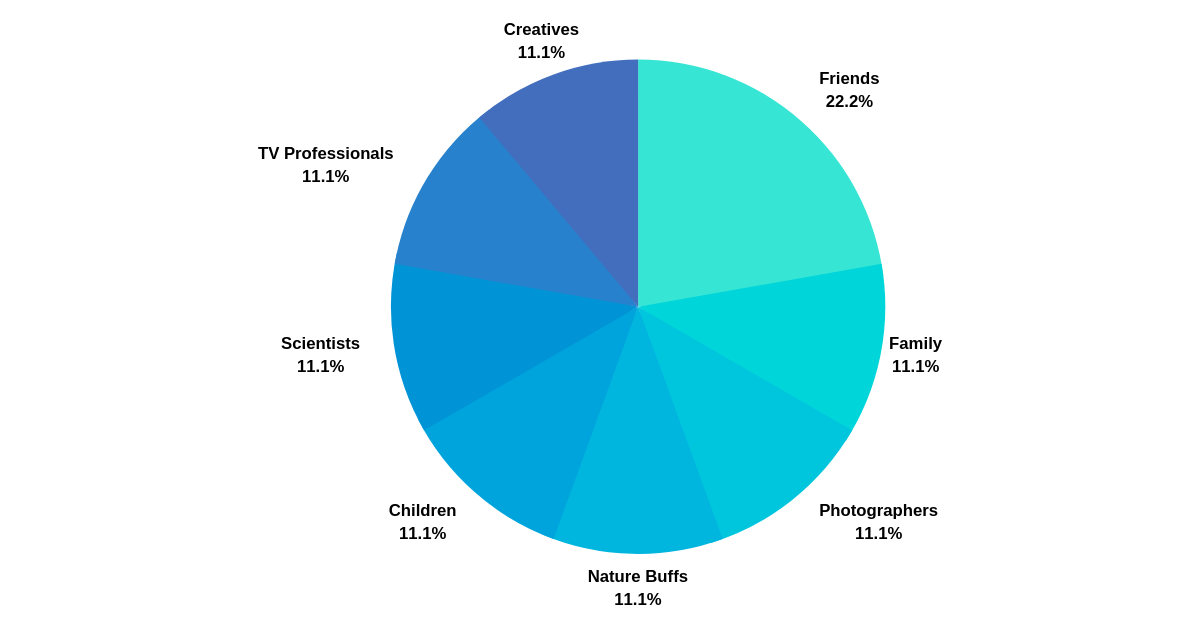
Who do photographers share their phone photos with?
Here’s another fun and unscientific graph I made to see who the photographers I interviewed share their photos with. Any surprises here?
How do photographers share their cell phone photos?

Well, I wasn’t surprised about the extensive use of social media to share mobile phone photos. But it was interesting to see that at least of the group I spoke with, they rarely share them on their websites.
Both cell phone cameras and traditional cameras have their place.
Marianne Katser, notes that a cell phone and a traditional camera each have a specific purpose for her.
“My cell phone goes with me everywhere so the photos I take are spontaneous, in my case, with no continuity or context. They are a shared comment of a present moment. So the only decision to make is: is the image I see worth being taken? Compared to the average user, I hardly ever touch my phone!”
She goes on to say, “For my fine art or portrait photography I use a digital or film camera. Even if some photos I take with them are also spontaneous, they will be part of a series aligned by a certain concept.
In the end, I just take an image with whatever camera I have at hand, and the type of camera determines whether it goes to Instagram or to my archive.”
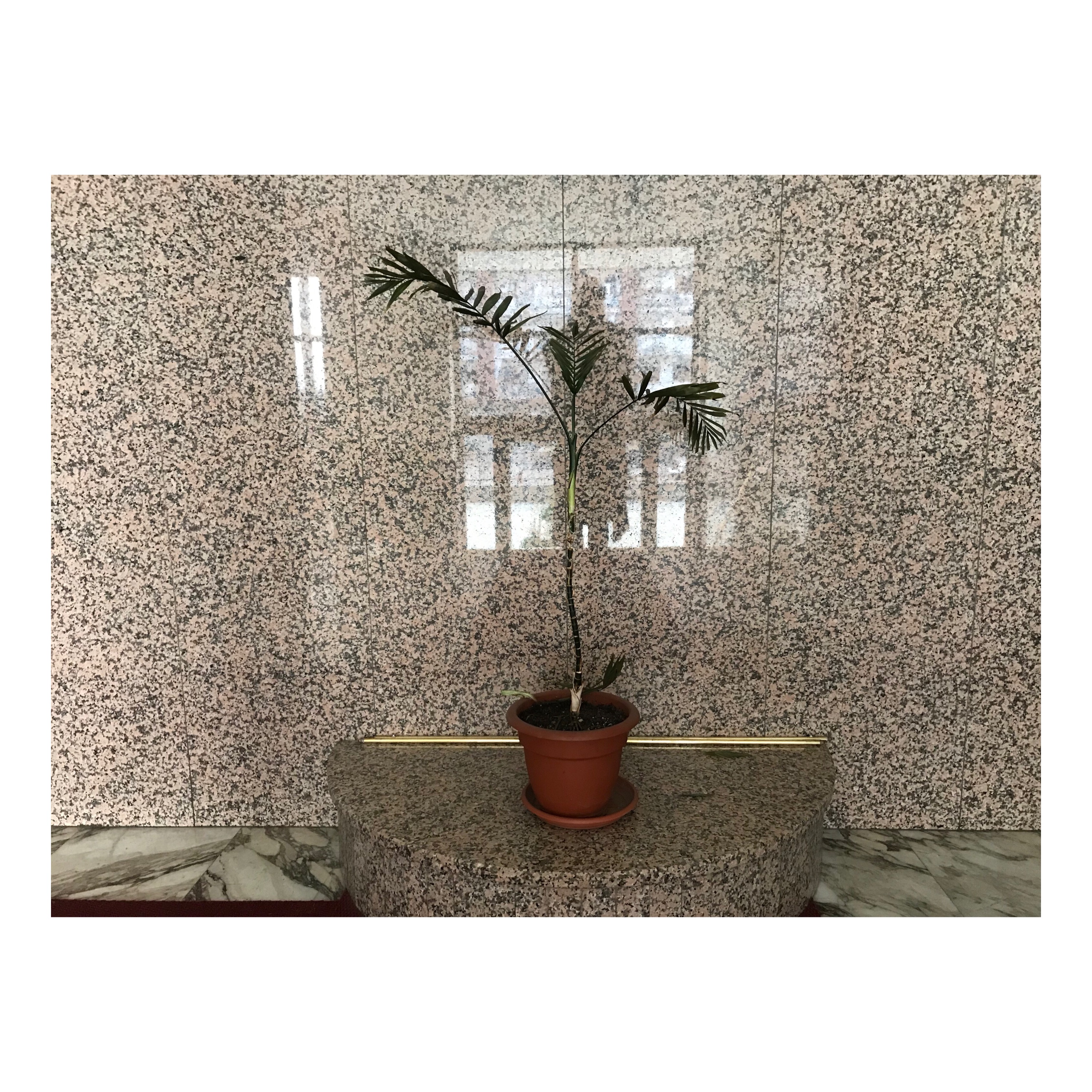
So, Marianne makes the photo with whatever tool is available. Very wise!
It’s interesting to me that she decides where to share the work depending on which tool she used to make it. When we’re working within a specific series, there is a lot of effort put into the process, so it makes sense to have our traditional camera handy.
Los Angeles-based photographer Shane King speaks to a similar sentiment. He says, “I use my phone for casual photos and occasionally snapshots—dishes I cook, portraits of my dogs, sunsets, things like that.
I use my main camera, a Leica, when it’s an image that requires high quality. Basically, I use the phone if the image is just something casual to send to a few friends and not worth spending an hour importing to my computer and retouching.”

Jonathan Beller a photographer and film director also mentions ease of use when it comes to a cell phone. “I always have the phone on me,” he says. Jonathan once documented his month-long hospital stay for (untreated) sepsis and diabetes with only his cell phone.
https://www.instagram.com/p/BRn74Z9B3K7/
https://www.instagram.com/p/BU2jvAVBhxG/?utm_source=ig_web_button_share_sheet
Adelaide-based photographer and web editor Mike Lim says, “I use my phone because I usually have it with me. It’s my way of being aware of the work and to do a kind of daily practice with photography. It’s my diary of things I see. The lack of fine control is not really an issue for me because under the right conditions and within limits, the image quality is pretty good, for internet and small prints.
In some ways, I use my phone like a Holga. It’s got certain limitations and characteristics which creates certain views. At the moment, my phone lens has a crack in it that creates a weird flare when the light is right. I’m living with this and using this effect where I can.”
He mentions that he pulls out his traditional camera in other instances.
“I use my cameras when I have specific projects. It’s a more deliberate decision to carry my camera for something I want to take. I have Fuji mirrorless cameras, plastic film cameras (Holga and Klack), medium format and 35mm film cameras.”
https://www.instagram.com/p/Bnc-04sA0c2/
How do you get the best results possible with a cell phone?
These photographers gave a lot of good hints about apps and settings that can make your cell phone photos stronger. I’ve fleshed out their suggestions with some additional ways to make the best cell phone photos possible.
1. Shoot RAW and adjust in Lightroom or Photoshop
RAW images give you a lot more to work with, in fact, they are untouched large files from your camera. Unlike JPEGs, it’s a lot easier to get your white balance and tones perfect on a RAW image. However, these photos do take up a lot of storage and memory space, so decide if the images are worth the storage space. You may want to shoot RAW for situations such as a complex landscape or a color-rich, highly detailed wedding photo. Newer iPhones allow you to shoot RAW, but you must use apps to do so. Try either the Adobe Lightroom CC, or Manual apps.
https://www.instagram.com/p/Boaix7Yn7rF/?utm_source=ig_web_button_share_sheet
2. Use manual mode
If you aren’t able to use RAW on your camera phone, or don’t have space available, you can still use manual mode for your jpeg images. This will allow you to adjust ISO, shutter speed, and white balance. If you learn how to to use these settings, you’ll get better results than shooting in auto mode. Only later-model camera phones offer this ability, though.
In some cases, you can also use apps to accomplish the same things. Check out apps like Manual (for iOS), or Afterlight (for iOS and Android). Aside from letting you make manual adjustments, these apps also offer filters, which I’ll get into below.
After shooting in manual mode, you can make adjustments in Lightroom or an app such as Afterlight.
3. For minor adjustments, use apps like VSCO Cam (for iSO and Android) or Instagram to achieve the look you want quickly for web
Both programs offer filters, which are preset color and contrast profiles that you can quickly use on your photos to create the look you want. But be careful— they can make your images look over-processed and fake.
My advice is to experiment until you find filters you like. Then, keep in mind that you don’t have to use those filters at 100% strength; sometimes they look better at 50% or less. Again, the key is to experiment.

4. Consider angle, and be intentional about your selfies
Yes, selfies, we all take them. Admit it.
If you’re taking self-portraits, it’s good to consider the angle. What are you trying to convey? Depending on the quality of your camera phone, you may have to experiment to get an angle that offers a truer likeness. Consider sitting, propping your camera on something, or shooting in different light.
https://www.instagram.com/p/BwAsovGBJdJ/?utm_source=ig_web_button_share_sheet
5. Try High Dynamic Range for specific shots
As my interviewee Jim mentioned, taking advantage of HDR or High Dynamic Range, that’s usually a feature of later-model mobile phones, will help you access more detail in the lightest and darkest parts of your photos, creating better overall color balance. HDR is most useful in brightly lit rooms or colorful scenes. But using it takes your camera longer to process, so, because of this, you should avoid using it if you’re trying to take a photo of a moving subject. Remember that it may not be suitable for other photo settings and try turning HDR off if things aren’t looking the way you want them to.
If your cell phone has HDR, it is usually part of the auto setting. But you can turn it off in the menu. Note that when you use HDR on iPhone, your phone’s default is to save two versions of the image, with and without HDR. If you want to save only the HDR version in order to maintain storage space, open Settings > Camera > Select HDR at the bottom, and uncheck Keep normal photo.
https://www.instagram.com/p/BwMpMBDgRkT/?utm_source=ig_web_button_share_sheet
6. Try these three ways to banish blur
A lot of cell phone photos are awfully blurry. Here are three ways to make clearer photos.
1) Use a mini-tripod or selfie stick (I love that the Indonesian name for a selfie stick is tongkis, short for “narcissist’s stick.”) If your camera is still, you won’t get blur unless your subject is moving.
If you don’t have access to a stick or tripod, prop your hands on the side of a tree or a friend’s shoulder to avoid motion. I like to sit down and balance my phone on my knee, in order to avoid motion. If you stay still, this even works for night shots.
2) Use a motion stabilizer setting to avoid camera shake when shooting photos or film clips. The stabilizer can help avoid the inevitable shake of your hands, but again, if you’re photographing a moving subject, you’ll still experience some blur.
3) Use your camera’s focus lock setting
If your cell phone focused on the wrong part of the image, you should consider using the focus lock setting like Natalyn mentioned in her interview above.
First, think about which part of your photo you’d like to be in focus. Let’s say you’re taking a photo of a person with a house in the background and you’d like the person to be in sharp focus. Focus lock allows you to focus on the person, set your focus, and then move your phone to compose the photo you want without worrying that your focus has been lost. Autofocus is sometimes not smart enough to understand what you’d like to be in focus.
https://www.instagram.com/p/Bu6VirLFUDQ/
7) Follow other photographers and see how they handle creative problems.
If you enjoyed the images from the photographers I interviewed, why don’t you follow them on Instagram or check out the work on their websites? And here’s my account; let’s stay in touch.
A few last words about making great cell phone photos
So, how can you make more polished photos with your cell phone? Experiment with these features and see what combination works best for you. For extra credit, you can write down your thoughts. It can be useful if you’re trying new approaches, sometimes it’s hard to remember everything you’ve tried!
Don’t throw your traditional camera away (Who would do that, anyway?)
Despite the impressive optics of newer phone cameras and the tools I mentioned above, there are still many technical reasons to use a traditional camera to get the results you need for certain projects. After thinking about the project you want to shoot, you’ll probably have an idea of when to use a cell phone versus a digital camera.
Finally, interviewing the 14 amateur and professional photographers for this blog post has really driven home my belief that photography is not so much about the tool you use, but more about your vision.
Whether you’re using a $5000 camera or a 5-year-old camera phone, the more important question to ask yourself is: “What am I trying to say with my photography and can I say it with this tool?”
Finally, because you’ve stuck around to the end, I want to offer you a bonus.
When you subscribe to my email list, you’ll receive the FREE email course, Create A Compelling Photo Story In One Week, and hone your storytelling skills. I designed the course to be easy enough to enact in a week, but with concepts you can continue using in your photography going forward. And rest assured, you can take the course using whatever camera you have available.

In the course, I teach you how to take your idea for a photo project, make the photos, and then create an engaging sequence that tells the story well. By the end of the week, you’ll have a finished body of work to share! Sign up for free here.
The people who contributed to this interview:
Marianne Katser: Instagram, website
Brendan Daily: Instagram
Natalyn Bradshaw: Instagram
Diana Nicholette Jeon: Instagram, website
Shane King: Instagram
Ony Jamhari: Instagram
Joshua White: Instagram
John Watts-Robertson: Instagram, website
Deanna Dikeman: Instagram
Jimmy Gadd: Instagram
Eric Mencher: Instagram
Jonathan Beller: Instagram
So, when do YOU use your cell phone, and when do you pull out your traditional camera to take photos? I’d love to hear in the comments!

3 Responses
This website is amazing—the content is incredibly helpful and well-organized! Browsing is quick and smooth, making the whole experience a pleasure
The website is clean and easy to use. Products are well-categorized with clear specs.
Really enjoyed browsing your website! The products—from robots and electronic toys to kitchen gadgets—are displayed perfectly.